Lenovo X1 Yoga – Monitors Not Working
Should your laptop no longer be working with the monitors through the dock, please try the following.
- Verify your monitors are turned on and plugged into power.
- Verify your docking station is plugged into power.
- Verify your monitor cables plugged into the dock and the back of the monitor.
- Verify your USB C cable is correct on the dock and your laptop:
- See Lenovo X1 Yoga – Docking Station for instructions.
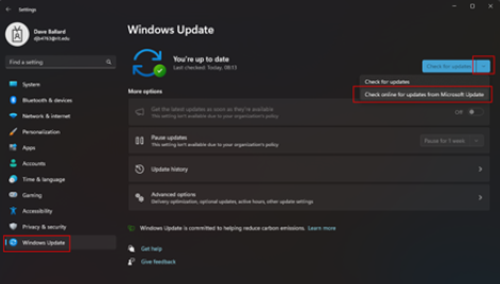
- Manually force an update of drivers by doing the following:
- Open Settings from the Start menu.
- Click on Windows Update along the left-hand side.
- Click on the down arrow next to Check for updates and select Check online for updates from Microsoft Update. This tool will also check for driver updates in addition to Windows updates.
- Allow the updates to install and then reboot.